HTML Accessibility Checks
This feature was introduced in Quarto 1.8.
Quarto includes integrated support for axe-core, a broadly-supported, open source, industry standard tool for accessibility checks in HTML documents.
Accessibility checks with axe-core
To enable the simplest form of accessibility checks in Quarto 1.8, add the axe YAML metadata configuration to HTML formats (html, dashboard, and revealjs):
format:
  html:
    axe: true
In this situation, if your webpage has accessibility violations that axe-core can catch, Quarto will produce console messages that are visible by opening your browser’s development tools.
Customization
Quarto supports two additional output formats for the accessibility checks, available through the output option.
document: embedded reportsformat: html: axe: output: documentWith this option, Quarto will generate a visible report of
axe-coreviolations on the webpage itself. Each violation displays its WCAG conformance level (e.g.,WCAG 2.0 AA), so best-practice findings are distinguishable from genuine WCAG failures. This is useful for visual inspection of a page. Note that with this setting, Quarto will always produce a report.If you wish to use this feature, we recommend adding it to a “debug” project profile to reduce the chance you will accidentally publish a website to production with these reports.
json: JSON-formatted console outputformat: html: axe: output: jsonThis option is useful if you’re comfortable with browser automation tools such as Puppeteer and Playwright, since it produces output to the console in a format that can be easily consumed.
Specifically, the JSON object produced is the result of running
axe-core’srunmethod on the webpage. We defer toaxe-core’s documentation for full information on that object.consoleformat: html: axe: output: consoleThis option is equivalent to
axe: true.
Checking against a WCAG conformance level
The standard and best-practice options were introduced in Quarto 1.10.
By default, axe-core runs its full default rule set, which combines rules for several WCAG versions and levels with axe’s own “best practice” rules. If you are working toward a specific WCAG conformance level, use the standard option to check only the rules for that level:
format:
  html:
    axe:
      output: document
standard: wcag21aaThe available values name a WCAG version followed by a level: wcag2a, wcag2aa, wcag2aaa, wcag21a, wcag21aa, wcag21aaa, wcag22a, wcag22aa, and wcag22aaa. Each standard is cumulative — it includes the rules for the lower levels and earlier versions it builds on. For example, standard: wcag21aa checks the rules for WCAG 2.0 A, 2.0 AA, 2.1 A, and 2.1 AA.
For the full list of rules, grouped by these same WCAG versions and levels, see axe-core’s rule descriptions; each rule links to a page describing what it checks, why it matters, and how to fix violations.
Setting standard has two effects beyond filtering the checks to the chosen level:
Choosing a standard can surface violations the default checks don’t report, because
axe-corekeeps a few rules off by default and Quarto enables them when your standard requires them. For example,standard: wcag2aaachecks text contrast against the stricter AAA ratio rather than the AA ratio, andstandard: wcag22aachecks that interactive elements like buttons and links are large enough to tap — a requirement introduced in WCAG 2.2. Rules thataxe-corehas deprecated are never added, whichever standard you choose.Axe’s best-practice rules — recommendations that aren’t required by any WCAG success criterion — are excluded. To check them alongside a standard, add
best-practice: true:format: html: axe: output: document standard: wcag21aa best-practice: true
You can also exclude the best-practice rules without choosing a standard by setting best-practice: false on its own; the WCAG rules from the default rule set still run.
Example: insufficient contrast
As a minimal example of how this works in Quarto, consider this simple document:
---
title: Testing Quarto's accessibility checker
format:
  html:
    axe:
      output: document
---

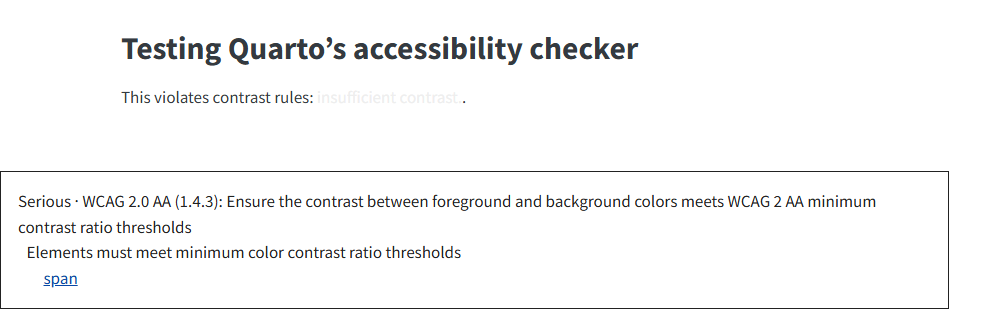
This violates contrast rules: [insufficient contrast.]{style="color: #eee"}.
---
title: Testing Quarto's accessibility checker
format:
html:
axe:
output: document
---
This violates contrast rules: [insufficient contrast.]{style="color: #111"}.This is the produced result visible on the page:
Planned work: automated checks before publishing
Currently, this feature requires users to open the webpage in a local preview. (Before Quarto 1.10, the axe-core library was loaded from a CDN; it is now bundled with Quarto, so checks also work offline.)
In the future, we envision a mode where every page of a website can be checked at the time of quarto render or quarto publish in order to reduce the amount of required manual intervention.